

Business and video conferencing systems, part one – terminal or cloud?

What is video conferencing for business and which video conferencing system for meeting rooms will be the best? What should you focus on first? Such questions are appearing more and more often among companies that want to take advantage of the opportunities offered by new technologies. And as usual, there is no universal answer that will satisfy all parties.
With this in mind, we have prepared a two-part guide on choosing first the system, and then the appropriate video conferencing equipment. We want to shed more light on those first few decisions that need to be made so that in the future, every meeting with video conferencing elements takes place without problems and actually helps, rather than irritates.
We present an introduction to the technology, main trends, possibilities, and a handful of suggestions – however, we leave the drawing of conclusions and the choice of the appropriate solution to the decision-makers.
The guides are prepared mainly based on video conferencing equipment from the AVer brand and cloud video conferencing systems from Vidyo.
Part one – terminal or cloud?
The beginnings
Initially, video conferencing systems were advertised as an alternative to long business trips, and slogans like Instead of traveling – a comfortable conversation via a video conferencing connection were (and still are) part of the marketing materials for these solutions.
However, over time, as video conferencing became more popular, the approach changed. Video conferencing became a tool in business work – alongside emails or instant messengers. More appropriate advertising slogans also appeared: Working together and daily discussions on a project when the team operates in several cities? Why not!
It is worth mentioning remote work, which is an increasingly common way of employment, especially when it comes to high-class specialists. In this regard, video conferencing proves to be a great support.
And it is precisely the above paragraphs that reflect what today’s video conferencing systems are. It is another method of business communication that is intended to positively influence the flow of information, work efficiency, or its effectiveness.
In the era of widespread video conferencing, distance no longer matters.
Hardware video conferencing (on-premises) or cloud?
This is the basic question that needs to be answered at the first stage of choosing video conferencing equipment. Initially, video conferencing systems were solutions that required significant investment, especially in hardware – server, endpoints, or infrastructure. Implementation was also expensive, which, together with equipment prices, meant that this solution was available only to large enterprises, where it was usually used for communication by the highest-ranking employees.
That is how video conferencing started, and these were the direct predecessors of today’s hardware solutions.
An example? The Polycom ViewStation® popular in the late 90s.
With the development of technology, the popularization of high-speed internet access, and the growing interest in the SaaS (Software as a Service – software as a service) business model, a new category of video conferencing solutions emerged. Thanks to the benefits of Cloud Computing, this solution allows for a quick video connection via any computer with an appropriate operating system and network access. This is how cloud video conferencing was born.
An example? Skype, which is still popular today.
However, it must be admitted that today a rigid division into cloud and hardware video conferencing no longer exists and is not needed. Although you still have to choose at the beginning whether you will use a hardware solution in the form of a separate terminal or software installed on a computer that uses the cloud for communication. However, regardless of the initial choice, today’s user does not close themselves off to the other option.
Hardware video conferencing / on-premises
Independent video conferencing systems, whose only (or main) role is efficient business communication, are often associated with significant investment costs. It must be admitted that this is no longer the rule. These are no longer complicated and expensive systems available to a few, but efficient terminals focused on communication, which – correctly deployed and implemented – give an effect most similar to being in the same room with other video conferencing participants.
To reduce implementation costs, such systems can be divided into bridges and endpoints. One bridge is able to set up a multi-party connection from several locations (endpoints or other bridges) simultaneously. In turn, individual endpoints can only establish point-to-point connections.
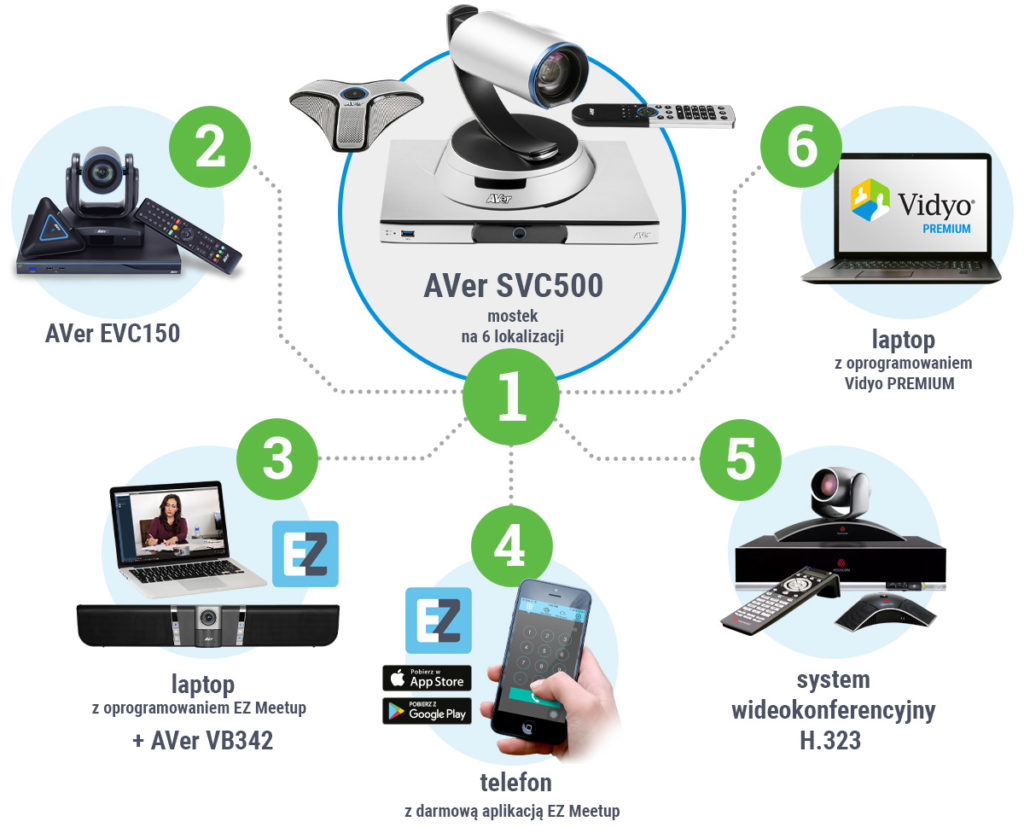
Thanks to narrow specialization, such equipment is focused on providing the highest quality connection – high resolution, high frame rate, and very good audio make communication smooth. This is helped by the fact that the cameras and microphones included in the set are perfectly tailored for business communication. On the other hand, systems of this type require implementation and close cooperation with IT during the first launch and testing. Today’s systems (even from other manufacturers) usually operate based on the same communication protocols: H.323 and SIP. This means that communication between hardware terminals from different manufacturers is usually not a major problem.
Pros and cons of hardware video conferencing
Pros
- Equipment focused on communication – does not require a computer
- High audio and video quality
- Smoothness / connection stability
- Increased security of transmitted data (no cloud in between)
- Good communication between systems from different manufacturers, provided they are based on the same standard
- Potential additional features, such as session recording, streaming capability, or compatibility with Skype for Business
Cons
- Higher initial investment costs
- One room = one system = high costs
- Requires integration and regular IT support
- Potential difficulties with external communication (users outside the system)
- High costs of expanding the terminal, e.g., for supporting additional endpoints
- Only selected suppliers offer integration with Microsoft Teams / Google Hangouts services
- In case of a bridge failure, lack of network, or power in the central location, there may be problems with setting up a multi-party connection
Hardware video conferencing – for whom?
- for users accustomed to this type of solution, so-called traditional recipients
- for those who pay special attention to the security of data and transmitted information:
- corporations
- military
- government and administrative units
- for those looking for the best connection quality
- for those looking for a stable and proven solution for meetings within the company, e.g., between branches, board members, supervisory board
Hardware video conferencing – who do we advise against it?
- people who do not part with their laptop, which is their communication hub
- those creating a communication system with a large number of rotating people from the outside, e.g., clients or mobile people
Example of hardware video conferencing
The EVC series is a hardware solution that offers great features known from more expensive systems at an affordable price.
- support for up to 10 locations
- high-class PTZ camera with a wide viewing angle
- optional support for Skype for Business
An advanced series of video conferencing from the AVer brand, which, in addition to providing the highest quality business communication, allows for:
- connecting and controlling two cameras simultaneously,
- built-in support for Skype for Business,
- streaming the video conferencing session, e.g., on YouTube,
- support for up to 16 locations,
- built-in hard drive for recording video conferences.

Cloud video conferencing / applications
The rise in popularity of Cloud Computing and the mass migration of applications to cloud computing did not bypass the video conferencing market. Where previously a video conferencing terminal integrated with a network and a display in the form of a TV or projector was required, now it is enough to click the appropriate icon on the desktop to connect to any place on earth. The development of computer hardware was also significant, which meant that every multimedia device – laptop, tablet, or smartphone, is currently equipped not only with a microphone but also with a camera.
Software developers took advantage of this, massively providing easy-to-use applications for communication, both with friends and for business. Great competition in this field stimulated the development of video conferencing applications, which today are real powerhouses when it comes to the offered possibilities.
The best example is the universal Vidyo application. It presents the scalability typical of cloud solutions – from the maximum number of users in a session to the available features. However, importantly, it can be an ideal bridge for creating video conferences with the participation of on-premise solutions (such as AVer EVC/SVC).
Another important factor is that the office suites necessary for the work of almost every enterprise – Office from Microsoft or G Suite from Google, include video conferencing applications in the set. These are Microsoft Teams and Hangouts Meet, respectively.
Cloud video conferencing is simple, scalable, and using it is like using any other program running on Windows or iOS. An important plus is seamless access for third parties who do not use video conferencing on a daily basis and do not have equipment or software. Just send a link, and the recipient, after opening it, is a full-fledged participant in a moment. On the other hand, this is no longer equipment, but a service that you have to pay for in an annual or monthly settlement – which may not appeal to everyone.
Reports about lower security of cloud services are also a myth. Once again, it is worth citing the example of Vidyo, which as a SaaS service can be set up locally, at the client’s site. Such a form of “cloud” was used, among others, by CERN, which, as a nuclear research agency, pays special attention to security.

However, the service itself is not everything – because a business video conference in which more than two or three people participate on one side cannot be well realized using a camera and microphone in a laptop. To achieve quality that will allow for seamless business communication, you should equip yourself with appropriate class accessories – especially a microphone and a camera. But you will read about this in the second part of our guide.
Pros and cons of cloud video conferencing
Pros
- Simple operation and ease of communication
- Created for “external” communication – you don’t need to have special equipment or software
- Low / zero initial cost (they are already available in office packages)
- More flexible offer and the ability to adjust the product to needs (e.g., increasing or decreasing the number of features or users)
- Simple implementation and no need for updates (automatic update on the server)
- Great collaboration possibilities – from quick file sending to desktop sharing
- Access from a laptop / tablet / smartphone allows you to turn any room into a video conferencing room
- In Vidyo cloud solutions, security is at a very high level – communication is encrypted at various stages of the hardware connection AES, TLS SSL, logarithms on elliptic curves ECDH, RSA are used to encrypt RTP traffic, each endpoint has a special, unique security token generated during the first installation.
Cons
- Subscription model translating into higher investment costs after a certain time
- Dependence on the solution provider may cause the service to be unavailable for reasons beyond the user’s control (server failure, update, etc.)
- Usually, a separate purchase of accessories is required – especially an appropriate camera and microphone
Cloud video conferencing – for whom?
- for users with a limited initial budget and starting their adventure with business communication – the cloud is an alternative for small and medium-sized enterprises that cannot afford the on-premises option
- for those who want to use video conferencing mainly for external communication, e.g., with potential clients
- for small / medium-sized enterprises that are in a phase of intensive development and need flexible and scalable services, also for those who do not have or do not want to burden the IT department
- for enterprises already operating in the cloud (e.g., having Office365 or G Suite)
- for those who, apart from communication, want to use the video conferencing system as a tool for teamwork between teams operating in different locations – e.g., working together on files and other materials
- for those who use their notebook as an “all-in-one” platform
Hardware video conferencing – who do we advise against it?
- large companies that focus on solutions focused on a specific goal and prefer everything to happen on local servers and devices intended for only one purpose
- those who are looking on the market for remote communication solutions offering the best video and audio quality – here hardware solutions still dominate
Does choosing one of the above options limit us?
The answer is simple: absolutely not! Today, the dividing line is not as clear as it was a few years ago – cloud and on-premises services work efficiently together, and an initial focus on one solution does not cut off our path to integrating the other. Appropriate hardware or cloud bridges allow both solutions to participate in a single video conferencing session.
Both solutions also draw a lot from each other – providers such as Vidyo allow for the installation of a cloud service on a local server, and hardware terminal providers offer hybrid solutions connected to the cloud.
However, a choice is still necessary, and at the beginning of implementing these systems, it is worth considering and properly planning the implementation path.
Nothing stands in the way of starting from the top of the company structure and implementing several hardware systems for decision-makers, and then successively equipping generally accessible conference rooms with compatible cloud systems.
You can also implement video conferencing from the bottom up – for the needs of employees who use them for communication with the client, and then gradually making the equipment available within the company – equipping conference rooms or meeting rooms.
Choosing the type of solution or implementation methodology is the beginning of the journey. The next step will be choosing the equipment, especially video conferencing accessories, which will support the cloud service in providing high-class business communication. And for this purpose, the second part of the guide is being created – focused on choosing the right equipment that we will connect to a computer / laptop / Macbook and which will work in the existing conditions of the conference room.